PAYMENT BANK LICENSE TO DOP
MANY NEWS ARE COMING ABOUT PAYMENT BANK LICENSE TO DOP
SO WE MUST KNOW WHAT WILL HAPPEN WHEN DOP WILL GET IT .HERE IS THIS INFO
The Payments Bank will be set up as a differentiated bank and shall confine its activities to further the objectives for which it is set up. Therefore, the Payments Bank would be permitted to undertake only certain restricted activities permitted to banks under the Banking Regulation Act, 1949, as given below:
Acceptance of demand deposits, i.e., current deposits, and savings bank deposits. The eligible deposits mobilised by the Payments Bank would be covered under the deposit insurance scheme of the Deposit Insurance and Credit Guarantee Corporation of India (DICGC). Given that their primary role is to provide payments and remittance services and demand deposit products to small businesses and low-income households, Payments Banks will initially be restricted to holding a maximum balance of Rs. 100,000 per customer. After the performance of the Payments Bank is gauged by the RBI, the maximum balance can be raised. If the transactions in the accounts conform to the “small accounts”1 transactions, simplified KYC/AML/CFT norms will be applicable to such accounts as defined under the Rules framed under the Prevention of Money-laundering Act, 2002.
Payments and remittance services through various channels including branches, BCs and mobile banking. The payments / remittance services would include acceptance of funds at one end through various channels including branches and BCs and payments of cash at the other end, through branches, BCs, and Automated Teller Machines (ATMs). Cash-out can also be permitted at Point-of-Sale terminal locations as per extant instructions issued under the PSS Act. In the case of walk-in customers, the bank should follow the extant KYC guidelines issued by the RBI.
Issuance of PPIs as per instructions issued from time to time under the PSS Act.
Internet banking - The RBI is also open to applicants transacting primarily using the Internet. The Payments Bank is expected to leverage technology to offer low cost banking solutions. Such a bank should ensure that it has all enabling systems in place including business partners, third party service providers and risk managements systems and controls to enable offering transactional services on the internet. While offering such services, the Payments Bank will be required to comply with RBI instructions on information security, electronic banking, technology risk management and cyber frauds.
Functioning as Business Correspondent (BC) of other banks – A Payments Bank may choose to become a BC of another bank for credit and other services which it cannot offer.
The Payments Bank cannot set up subsidiaries to undertake non-banking financial services activities. The other financial and non-financial services activities of the promoters, if any, should be kept distinctly ring-fenced and not comingled with the banking and financial services business of the Payments Bank.
The Payments Bank will be required to use the word “Payments” in its name in order to differentiate it from other banks.
Deployment of funds
The Payments Bank cannot undertake lending activities. Apart from amounts maintained as Cash Reserve Ratio (CRR) with RBI, minimum cash in hand and balances with a scheduled commercial bank/RBI required for operational activities and liquidity management, it will be required to invest all its monies in Government securities/Treasury Bills with maturity up to one year that are recognized by RBI as eligible securities for maintenance of Statutory Liquidity Ratio (SLR). The Payments Bank will participate in the payment and settlement system and will have access to the inter-bank uncollateralised call money market and the collateralised CBLO market for purposes of temporary liquidity management.
6. Capital requirement
Since the Payments Bank will not be allowed to assume any credit risk, and if its investments are held to maturity, such investments need not be marked to market and there may not be any need for capital for market risk. However, the Payments Bank will be exposed to operational risk. The Payments Bank will also be required to invest heavily in technological infrastructure for its operations. The capital will be utilised for creation of such fixed assets. Therefore, the minimum paid up voting equity capital of the Payments Bank shall be Rs. 100 crore. Any additional voting equity capital to be brought in will depend on the business plan of the promoters. Further, the Payments Bank should have a net worth of Rs 100 crore at all times. The Payments Bank shall be required to maintain a minimum capital adequacy ratio of 15 per cent of its risk weighted assets (RWA) on a continuous basis, subject to any higher percentage as may be prescribed by RBI from time to time. However, as Payments Banks are not expected to deal with sophisticated products, the capital adequacy ratio will be computed under simplified Basel I standards.
As the Payments Bank will have almost zero or negligible risk weighted assets, its compliance with a minimum capital adequacy ratio of 15 per cent would not reflect the true risk. Therefore, as a backstop measure, the Payments Bank should have a leverage ratio of not less than 5 per cent, i.e., its outside liabilities should not exceed 20 times its net-worth / paid-up capital and reserves.
7. Promoter’s contribution
The promoter’s minimum initial contribution to the paid up voting equity capital of Payments Bank shall be at least 40 per cent which shall be locked in for a period of five years from the date of commencement of business of the bank. Shareholding by promoters in the bank in excess of 40 per cent shall be brought down to 40 per cent within three years from the date of commencement of business of the bank. Further, the promoter’s stake should be brought down to 30 per cent of the paid-up voting equity capital of the bank within a period of 10 years, and to 26 per cent within 12 years from the date of commencement of business of the bank. Proposals having diversified shareholding and a time frame for listing will be preferred.
8. Foreign shareholding
The foreign shareholding in the bank would be as per the extant FDI policy.
9. Voting rights and transfer/acquisition of shares
As per Section 12 (2) of the Banking Regulation Act, 1949, the voting rights in private sector banks are capped at 10 per cent, which can be raised to 26 per cent in a phased manner by the RBI. Further, as per Section 12B of the Act ibid, any acquisition of 5 per cent or more of voting equity shares in a private sector bank will require prior approval of RBI. This will also apply to the Payments Banks.
10. Prudential norms
As the Payments Bank will not have loans and advances in its portfolio, it will not be exposed to credit risk and, the prudential norms and regulations of RBI as applicable to loans and advances, will therefore, not apply to it. However, the Payments Bank will be exposed to operational risk and should establish a robust operational risk management system. Further, it may face liquidity risk, and therefore is required to follow RBI’s guidelines on liquidity risk management, to the extent applicable.
11. Business plan
The applicants for Payments Bank licences will be required to furnish their business plans and project reports with their applications. The business plan will have to address how the bank proposes to achieve the objectives of setting up of Payments Banks. The business plan submitted by the applicant should be realistic and viable. Preference will be given to those applicants who propose to set up Payments Banks with access points primarily in the under-banked States / districts in the North-East, East and Central regions of the country. However, to be effective, the Payments Bank should ensure widespread network of access points particularly to remote areas, either through their own branch network or BCs or through networks provided by others. The bank is expected to adapt technological solutions to lower costs and extend its network. In case of deviation from the stated business plan after issue of licence, RBI may consider restricting the bank’s expansion, effecting change in management and imposing other penal measures as may be necessary.
12. Corporate governance
The Board of the Payments Bank should have a majority of independent Directors.
The bank should comply with the corporate governance guidelines including ‘fit and proper’ criteria for Directors as issued by RBI from time to time.
SOURCE :RBI
| |

Showing posts with label SAPOST. Show all posts
Showing posts with label SAPOST. Show all posts
Wednesday, July 1, 2015
PAYMENT BANK LICENSE TO DOP


Monday, May 6, 2013
Project Arrow Web Portal
Project Arrow Web Portal 
A Web Portal for Project Arrow is made available in url: www.indiapostarrow.gov.in and the url is updated in the Weblink-04.05.13

A portal is generally a vehicle by which to gain access to a multitude of 'services'. A web site is a destination in itself. As such the term website refers to a location on the Internet that is unique and can be accessed through a URL. By that definition a web portal is in fact also a website. However there is a distinction between the two terms based on the subject and content of the website.
A website is also a web portal if; It transmits information from several independent sources that can be, but not necessarily are, connected in subject; thus offering a public service function for the visitor which is not restricted to presenting the view(s) of one author. The Portal and Website can be differentiated as:
Authentication:
Portal: It provides facility of Logging-In. Provides you with information based on who you are. e.g. mail.yahoo.com, gmail.com, rediffmail.com Website: No log-in. e.g. www.yahoo.com Personalization: Portal: Limited, focused content. Eliminates the need to visit many different sites. e.g. You type in your user name and password and see your yahoo mail only. Website: Extensive, unfocused content written to accommodate anonymous users needs. Customization: Portal: You will select and organize the materials you want to access. Organized with the materials you want to access. Website: Searchable, but not customizable. All content is there for every visitor. e.g. you can navigate to yahoo mail, yahoo shopping, geo cities, yahoo group. If you wish to use any of these services you will either have to authenticate yourself and see things personalized to you or you can simply visit sections that are for everyone like yahoo news were if you are not signed in then the default sign in is guest. Best way can say that web portal is all about the high featured and site is just with information. Another good difference forum is come with lot of pages where site have a few pages.
Courtesy: srputtur
| |
|
Wednesday, April 3, 2013
DBAnalyzer for Sanchay Post 02-04-2013
| ||||
| ||||

Wednesday, March 7, 2012
Step by Step Guide to Create Maintenance Plans in SQL Server 2008 R2





Guidelines to make new computerized office functional
Question by:Subhash Sharma A new sub office is opening in this division. Please provide the initial guidelines to make new office functional. DOs and Donts in this regards. Actions to be taken at head office to add the new sub office in different modules i.e. Sanchay Post, Sub Accounts, Treasury, SQL server and other related modules. Reply By: Vikram Paraghi Setup Your Server With Smooth Setup & Updates with All Drivers Change Server Name & Restart Setup Administrators Password Give Fix IP & Restart Install Antivirus Update it Install SQL & Register Install POS Server Than Operator than initialize with Details asked Install Sub Account Server Than Operator initialize with Details asked Install Treasury Server Than Operator initialize with Details asked Install SB Cash Setup initialize with Details asked Install Postman initialize with Details asked Install eMO, ePayment, Rnet Communication & Initialize Its All About Meghdoot Basic Setup Sequence & Guideline for fresh setup at new office source: https://www.facebook.com/groups/309501009093194/ Share and Care |
Creating Maintenance Plans in SQL Server 2008 R2
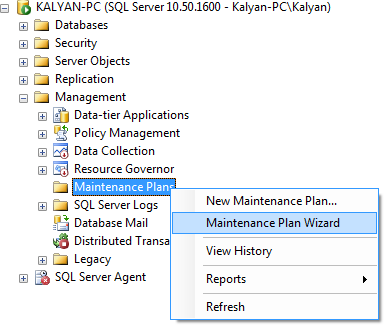
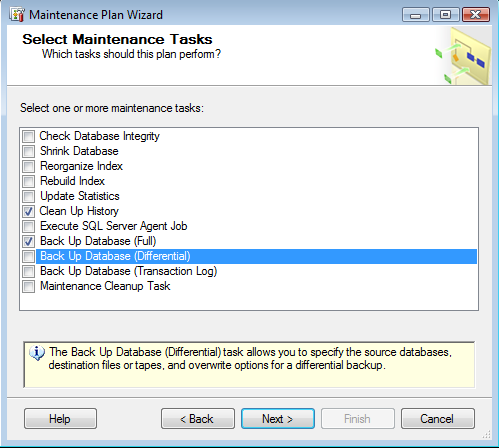
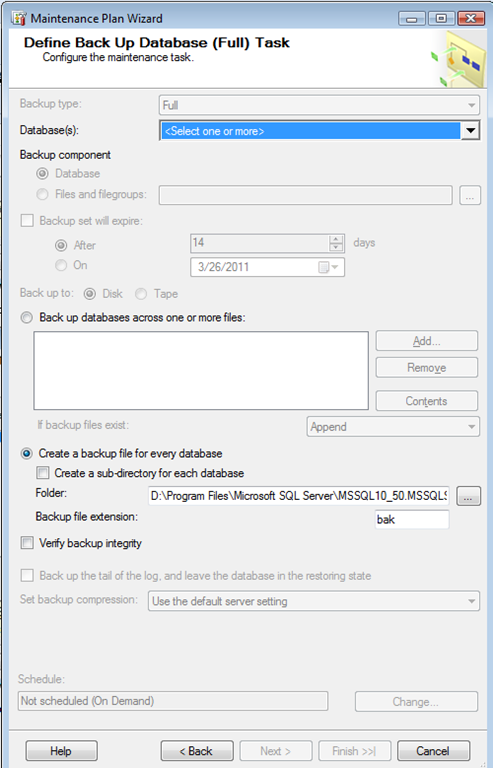
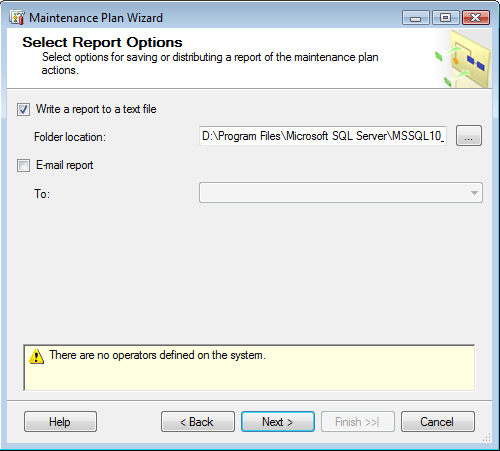
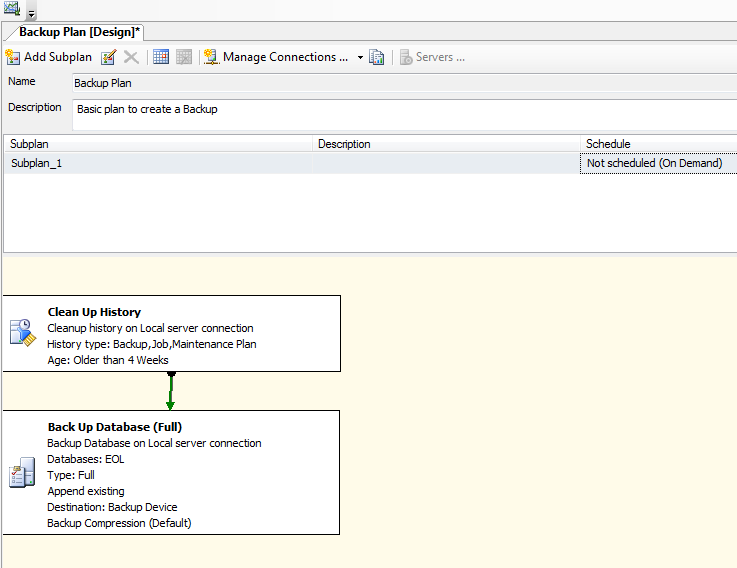
Creating Maintenance Plans in SQL Server 2008 R2 One of the repetitive task that DBA need to perform is create maintenance plan for database. Maintenance plans enables you to automate maintenance activities for a database, backups, db integrity checks and index maintenance tasks. We can easily create a maintenance plan using a wizard in sql server 2008 R2. You can use the following steps to create a maintenance plan 1. Select the Maintenance Plan Wizard from the context menu as shown below 2. You can specify a name and description for the plan and select the desired scheduling options 3. Select next to see the maintenance tasks that you want to perform 4. Select the Maintenance tasks order 5. Select the database for the backup task. 5. Select the reporting option for the plan like write log to a specific location or send an email or both. 6. Click finish to create your plan , while the plan is being created you will get the following status dialogue 7. You can see the created maintenance plan in object explorer when you double click the Backup Plan from above window, you can get the designer Thanks to:Sujay Chidanandam Instant Backup STUDIO- CONNECT- EXPAND DATABASE- RIGHT CLICK ON DATABASE-TASK -BACK UP - OK -OPTION -SELECT OVERWRITE EXISTING DATA OK Thanks to:Narendra Kumar source: https://www.facebook.com/groups/309501009093194/ Share and Care |
Wednesday, February 15, 2012
Computer Glossory
Computer Glossory Actuator arm: The arm in a disk drive that holds all of the read and write heads, and moves them in unison. Adapter card: A circuit board plugged into a slot in the motherboard to add features or peripherals to a system. Also called an expansion card Address: A hexadecimal number designating the location of a device or of a piece of data. Address lines: The lines in a bus or cable that carry address information rather than data. AGP: Accelerated Graphics Port, a high-speed bus just for video. Alphanumeric: Consisting of letters and numbers. Analog: Continuously changing, rather than jumping from one numerical value to the next. See digital. Application: A computer program to perform a specific task, as opposed to the operating system program that runs the computer itself. ASCII: A digital code for print characters, including those on a standard keyboard. It stands for the American Standard Code for Information Inter-change, ASPI: Advanced SCSI Programming Interface. The standard protocol used by most programs to access a SCSI device. ATAPI: ATA Packet Interface, the ATA/IDE standard for CD-ROM, tape and removable drives. Athlon: A high-speed CPU made by AMD. Average Seek time: The average amount of time it takes a disk drive to locate a specific track and sector. Backup: A copy of a disk or selected files made for safekeeping, usually to removable media. Base memory: The first 1 MB of system RAM. Basic Input / Output System: The hard-wired instructions that the CPU uses to boot up and to control I/O devices. Usually abbreviated as BIOS Batch file: A file with an extension of .BAT, containing a list of commands or program routines that the computer will execute in sequence. BAUD rate: A rate of data transfer, usually used to measure data rates over a phone line. Benchmark: A standard test or measurement used to compare the performance of similar components or systems. Binary: A number system using just two digits. BIOS: Basic Input / Output System. The hard-wired instructions that the CPU uses to boot up and to control I/O devices Bit: A single digit in the binary system, the smallest unit of computer information. Boot up: To start or restart a computer. From the phrase "picking yourself up by the bootstraps" Bus: A signal path that serves multiple devices or multiple points on a circuit board. Byte: A unit of digital information consisting of eight bits. Bache: A block of memory for temporary storage of data likely to be used again. The CPU and hard drive frequently use a cache. CD: Compact Disc. A thin platter that has computer data or music recorded on it in optical form. See CD-ROM. CD-R: A CD which can be written on by the user. A CD-RW can be written, erased and re-written. CD-ROM: Compact Disc Read-only Memory. The term is often used for the CD platters as well as for the drive, which reads them. Celeron: A low-cost Pentium without cache. Central processing unit: The master chip in a computer that controls the execution of program instructions, arithmetic functions, and access to memory and peripherals. Abbreviated CPU, and also called the microprocessor. CGA: Color Graphics Array. The first video standard for color monitors and video adapters Chip: A slang term for an integrated circuit. Chipset: The chip or chips on a motherboard containing various functions supporting the CPU. Circuit: Any combination of wiring and components that provides a path for the flow of electricity. Circuit board: A thin board, usually fiberglass, on which components are mounted. Also called a printed circuit board (or PCB) because the connections between the components are printed onto the board CMOS: A type of chip able to operate with a tiny trickle of electricity from a battery. The term also refers to the contents of a CMOS chip on the motherboard, which holds information about the system and its peripherals even while the system is turned off. CMOS stands for Complementary Metal Oxide Substrate. COM1: The name of the first serial port in a system. Additional ports are labeled COM2, COM3 and COM4. Communication: The exchange of information between two points. Computer: An electronic device for the storage and processing of information. Configuration: The way the parts of a system or network are arranged or connected, or the act of arranging them. Conflict: See resource conflict. Controller: A circuit that manages the operation of some part of a computer and its communication with the rest of the computer. Co-processor: See math co-processor. CPU: See central processing unit. Cylinder: The same-numbered tracks of all the platters in a drive make up a cylinder. Cylinder 1 is all Track 1s, cylinder 2 is all Track 2s, etc. Data: Information, especially information in a form that can be used by a computer. It can include text, numbers, sounds and pictures. A single piece of information is called a Datum. Data processing: Using a computer to manage or store information. Decimal: Based on ten parts. Device: Any peripheral or part of a computer system that can send or receive data. Digit: A single unit or numeral in a counting system. Digital: Made of or using distinct digits or numerical values, rather than continuously variable values. Most often used to refer to information existing in electronic form as Ones and Zeroes. Digital camera: A camera that records pictures electronically rather than on film. DIMM: Dual Inline Memory Module. Called Dual because it has separate signals to each side of the circuit board DIN: A type of connector for keyboards and mice, named for the German group originating the standard, Deutsche Industrie Norm. DIP: Dual Inline Package. The configuration of two rows of pins used by many ICs - This configuration is also used to combine several switches into a single component. Disc: Same as Disk. This spelling is usually used with 'Compact Disc'. Disk: A thin platter coated with a magnetic material, and used in a disk drive to store information. Also can refer to the drive itself Disk drive: A device used to store and retrieve information for a computer. It can be either a hard drive which has the platter permanently attached, or a floppy drive which has a removable platter. Diskette: The removable storage platter used in a floppy disk drive. DMA: Channels for Direct Memory Access, which allow a device to move data to and from RAM without interrupting the CPU. DOS: Disk Operating System. This is the operating system used by the original IBM PC and many since. Drive: A data storage device connected to a computer. Examples are a hard drive, floppy drive or tape drive. Drive parameters: The values for the number of cylinders, heads and sectors in a drive. Driver: Also device driver. A file containing the information an operating system or application needs to interact with a particular hardware device. These files will have an extension of .DRV (or .SYS in DOS) DVD: Digital Versatile Disk. A compact-disc format with much higher capacity than traditional CD-ROM DVD-RW: A DVD technology that allows the user to write to the disk. EGA: Extended Graphics Array. A video standard allowing up to 64 colors Electro-magnet: A magnet consisting of a coil of wire around a metal core. It is magnetic only when a current flows through the wire coil. E-mail: Electronic Mail, messages sent over a computer network. Expanded memory system: The combination of a memory manager program and plug-in Expanded Memory Cards. Abbreviated EMS, which also stands for Expanded Memory Standard Expansion card: A circuit board that plugs into a motherboard, used to add new peripherals to a computer system. Also called an adapter card Expansion slot: A socket on the motherboard that accepts an expansion card. Extended memory: System RAM above 1MB. Extended memory specification: The rules for using an extended memory manager to access RAM above 1MB. The specification is known as XMS and was developed jointly by several companies. FAT: File Allocation Table. A cluster map listing locations of the sequential parts of each file There are two copies of the FAT for each partition, located just after the volume boot record. FAT 16: The original FAT version allowing 1016 clusters per partition, with file names limited to 8 characters with a 3-character extension. FAT 32: A later version allowing 255-character file names and 1028 clusters per partition. Factory-type format: The same as a low-level format Firmware: Computer instructions which are permanently imbedded in the circuitry, usually in a ROM chip. Fixed disk: Another name for a hard drive Fixed media: The platters of a hard drive which, unlike a floppy diskette, cannot be removed Flash BIOS: A ROM BIOS chip whose content can be changed by the system without removing the chip. The same type of chip used in an adapter card or peripheral is called Flash ROM. Floppy diskette: The removable storage platter of a floppy disk drive. Floppy drive: A disk drive with a removable storage platter. Format: The size and shape of something, or the way it is arranged. In computers it refers to the way data is organized or presented, especially on the platters of a disk. FORMAT: The DOS command that creates the VBR, FAT, root directory and data areas for each partition. Also, either of two processes preparing the platter surfaces for data storage. See high level format and low level format. GB: Abbreviation for gigabyte. Giga: A prefix meaning one billion. When measuring computer data, it means 230 or 1,073,741,824, which is the power of 2 closest to one billion. Gigabyte: 1024 megabytes, approximately 1.074 billion bytes. Hard drive: A disk drive with permanent storage platters. Hardware: The physical parts of an electronic device, such as nuts, bolts and components. Hard-wired: Unable to change. Usually refers to instructions in a ROM (Read Only Memory) chip or to logic created with physical connections rather than software. Head: A part mounted very close to the surface of a disk platter to read or write data. Hexadecimal: Made up of 16 parts. The hexadecimal numbering system uses the numbers 0 through 9 plus letters A through F to represent the 16 digits. High-level format: The process of creating the FAT and other partition structures, done by the FORMAT command. IC: Integrated Circuit. A part containing within itself many other circuits IDE: A common hard-drive interface, standing for Integrated Drive Electronics. I/O: Input/Output. The flow of data to and from the CPU - Also refers to the peripherals sending the data, and the pathways they use. I/O Port: A hex address used by a device to send and receive data. Input: Data received by a device or by the CPU. Integrated circuit: See IC. Intel: A manufacturer of CPUs, motherboards and other components. Interface: The meeting point between a computer and something or (someone) outside of it. Common interfaces for peripherals are the serial and parallel ports. Common interfaces for people are the monitor screen and keyboard. Interleave: An offset between comparable sectors of adjacent tracks of a disk platter, needed because of the time it takes the heads to move from one track to the next. On some older drives, the interleave can be set by the user. Interrupt: A temporary break in the CPU's normal execution of program instructions, to allow it to handle a request from a peripheral. IRQ: Interrupt ReQuest, the signal that a peripheral or program uses to interrupt the CPU. ISA: The original PC bus architecture, and still included in many systems. It stands for Industry Standard Architecture. Joystick: An input device used for video games and for some graphics applications. Keyboard: An input device similar to a typewriter, for the entry of text, numbers and punctuation. Keyboard controller: A small processor on the motherboard that manages the entry of data from the keyboard. Kilo: A prefix meaning 1000. When used to measure computer data, it means 210 or 1024, which is the power of 2 closest to 1000. Kilobyte: 1024 bytes. Laser: A very pure and intense beam of light formed within a crystal, or the device that creates the light. LASER stands for Light Amplification by Stimulated Emission of Radiation. Legacy: Containing obsolete technology. Logical block addressing: A translation done by the disk controller of large-capacity drive so that the Head/Sector/Cylinder addresses will appear to be in the range recognized by the BIOS. Abbreviated LBA Low-level format: The initial factory process of putting on new sector marks to prepare the platter surface for data storage. A low-level format destroys any previous data on the disk. LPT-1: or LPT-2,3. The standard names for the parallel ports. LPT stands for Line PrinTer. Main-frame: A large computer designed to be used by many people at the same time. Male connector: A connector with pins that fit into the sockets of a female connector. Master: One of two drives attached to an IDE controller, the other being Slave. Master boot loader: The program in a disk's master boot record that contains instructions for loading in the operating system. Master boot record: The first sector on a disk, containing the partition table and master boot loader. Abbreviated MBR Master file table: The file-tracking system used instead of a FAT in the Windows NT file system. Math coprocessor: Circuitry to handle floating-point arithmetic for the CPU. It may be incorporated in the CPU or it may be a separate chip. Also called the NPU or Numerical Processing Unit MB: Abbreviation for megabyte. MBR: See master boot record. MCA: Micro-Channel Architecture. A type of bus introduced by IBM in the late 1980s - It is no longer manufactured. Media: Methods of communication. In computers, it refers to the material or device used to store or transmit data. Medium: Singular of Media. Mega: A prefix meaning one million. For computer data, it means 220 or 1,048,576, which is the power of 2 closest to one million. Megabyte: 1,048,576 bytes. Memory: The part of a computer that holds data. This usually refers to RAM. Memory bank: The number of memory modules needed to have the same number of data bits as the bus. In a 64-bit Pentium system, each DIMM is one bank, but two 72-pin SIMMs are required for each bank. Microprocessor: A master control circuit. See central processing unit. MicroScope: Trade name for a hardware diagnostic program that uses its own operating system to manipulate hardware directly without interference from the main operating system. Microsoft: A software company, best known for the Windows operating system. Modem: A device that allows a computer to send and receive data over a voice phone line. Modem stands for Modulator / Demodulator. Modulate: To change a signal in a way that conveys information. For instance, a tone sent over a phone line can be changed in volume or frequency to represent Ones and Zeroes, thus sending digital data over an audio line. Module: A self-contained part of something that can function on its own. Monitor: A peripheral device with a screen for the visual display of information. Motherboard: The main circuit board, containing the CPU. All of the other functions and peripherals are connected in some way to the motherboard. Mouse: An input device that controls an on-screen pointer. Multimedia: Presenting data in more than one medium, such as combining text, graphics and sound. NPU: Numeric Processing Unit. See math co-processor. NTFS: The disk file structure used by Window NT and Windows 2000, which has a Master File Table instead of a FAT. Operating system: The master control program that runs the computer and allows it to execute applications. Optical: Using light. OS: Operating system. Output: Data sent by a device or the CPU. Especially, the end result of a processing task, sent to the printer or to the monitor screen. Over-clocking: Setting the clock multiplier so that the CPU will run faster than its rated speed. Not a recommended practice. Parallel: Components or circuits connected to the same end points, so that each circuit provides an alternate path for electrical current from the same source. Compare to series. Parallel port: A connection for high-speed transfer of information, using multiple data lines. Parameters: See drive parameters. Parity: An extra bit added to data for error checking purposes, to make the quantity of Ones consistently either odd or even. Partition: A division of the hard drive, or the process of setting up divisions on the hard drive. PC: Personal Computer. An IBM or IBM-compatible self-contained computer system, designed to be used by one person at a time. PCB: See printed circuit board. PCI: A high-speed bus for 486, Pentium and compatible systems. PCI stands for Peripheral Component Interconnect. Pentium: A high-speed microprocessor chip made by Intel. Peripheral: Any of the devices which connect to the CPU and exchange information under the CPU's control. Peripherals include all of the computer's input and output devices. Pixel: Picture Element. A dot of light that is the smallest part of the visual image on a monitor. The number of pixels depends on the resolution setting of the monitor. Platter: The actual disk inside of a disk drive. Its surface is coated with a magnetic material that records data. Both sides of the platter are used, and a typical disk drive has several platters, stacked like pancakes. Plug-and-play: A standard that allows the system to automatically configure adapter-card resources. Port: A connection for moving data to and from the motherboard. POST: An acronym for Power-On Self Test, a series of instructions executed by the BIOS during boot-up to confirm system functions before turning control over to the operating system. The codes put on the bus during POST can be used by POST reader cards to diagnose systems that fail to boot. POST reader: A diagnostic card that is inserted into a bus slot to display the POST codes during boot-up. This is used to diagnose a system that won't boot up. The most comprehensive POST reader is Micro 2000's Universal Post-Probe. Printed circuit board: A thin board, usually fiberglass, on which components are mounted -So called because the connections between the components are printed onto the board -Abbreviated PCB Printer: A device that puts computer data onto paper. Processing: Using a computer program to manage data, either sorting it, storing it or changing it in some way. Processor: The part of the computer that controls the execution of program instructions. See CPU. Program: A series of instructions for completion of a specific task or for performance of an activity. RAM: Random Access Memory, the standard operating memory of the computer. Random access: Able to directly access any portion of data, without having to accept data in sequence. Read head: A head in a disk drive used to retrieve data from the platter. Read-only memory: Information hard-wired into chips. Used for the BIOS and in many I/O devices - Abbreviated as ROM Real-time clock: The CMOS circuitry that keeps track of the year, day and time of day for the system. Abbreviated RTC Refresh: A signal fed to RAM chips periodically, to keep them charged up so that data is not lost. Removable media: A cartridge or cassette that can be removed from the drive. Resolution: The sharpness of an image. Measured in a printer by Dots Per Inch, and in a monitor by the number of horizontal and vertical pixels. Resource conflict: The situation when two or more devices are trying to use the same system resources. Resources: See system resources. Riser card: A card that plugs into the motherboard to provide a perpendicular extension of the bus. Adapter cards are then plugged into the riser instead of the motherboard, allowing a lower profile to the case. Most often used for desktop systems that sit under the monitor. ROM: See read only memory. RTC: See real-time clock. SCSI: A high-speed interface for hard drives, CD-ROM drives, scanners and other devices. SCSI comes from Small Computer System Interface. Sector: A division of a disk platter, shaped like a piece of pie. Seek: In a disk drive, the process of finding a specific location, by moving the actuator arm over the desired track and waiting until the correct sector comes under the heads. Sequential access: Data must be read in the order it appears. This method applies to tape, and to a lesser degree to disks. Serial port: A connection for data transfer, using a single data line. Silicon: The element used to make transistors and integrated circuits. SIMM: Single In-line Memory Module, a small plug-in circuit board with one row of input signals. Software: Instructions for a computer, organized into sets called programs. Sound card: An expansion card with connections for speakers. Start bit: A zero bit marking the start of a serial port data byte. Stepping switch: A push-button switch on the Post-Probe that when pressed shows the code in the POST sequence immediately previous to the one currently displayed. Stop bits: One or more bits marking the end of a serial port data byte. Storage: Holding of program instructions and data for use by the computer. Temporary storage while the computer is running is provided by the RAM, and permanent storage is available on disk and tape. SVGA: Super Video Graphics Array, the enhanced version of VGA used in most new PCs. Standard resolution is 800 x 600 SXGA: A high-end video standard, with 1280 x 1024 resolution. It stands for Super Extended Graphics Array. System: All of the parts that work together for a particular purpose. A computer system consists of the monitor, keyboard, all of the components in the CPU cabinet and any peripherals connected to it. An operating system is all of the routines and utilities needed for control of the computer, organized into one program. System board: Same as motherboard. System resources: Motherboard features which must be allocated among devices. These include IRQs, DMA channels, I/O ports and ROM addresses. Tape drive: A storage device that uses a long strip of magnetic tape. Track: The path in a magnetic surface that actually holds the recorded data. On a disk platter, the tracks are circles, one inside of the other. On a tape, the tracks are parallel stripes that run the length of the tape. Transistor: An electronic device used to control the flow of electricity. UART: Universal Asynchronous Receiver/Transmitter, the control chip or circuitry for a serial port. Upper memory area: The 384KB of RAM between 640KB and 1MB, reserved in DOS for BIOS, video and adapter card ROMs. USB: Universal Serial Bus, a port that allows the hot-plugging of multiple external plug-and-play devices. Utility: A software program or routine that aids in system management. Universal Post-Probe: A POST reader card from Micro 2000 containing many advanced features, including the ability to read either ISA or PCI with the same card. UXGA: A high-end video standard. It stands for Ultra Extended Graphics Array, and has a resolution of 1600 x 1200. VGA: A video standard for unlimited color reproduction. Video: Having to do with the visual presentation of information, usually on a monitor screen. Video card: An adapter card used to manage the display on the monitor. Video controller: The circuitry driving the monitor display. This circuitry may be on the motherboard or on a video adapter card. Volume: A physical unit of data storage, such as a diskette, tape reel or one partition of a hard drive. Volume boot record: The first sector of a partition, containing the disk parameters of that volume. Warm boot: Restarting the boot-up without first turning off the power. Windows: A widespread operating system from Microsoft, used on approximately 80% of all PCs. Write head: A small electromagnet in a disk drive that puts data onto the platter. XGA: Extended Graphics Array, a video standard with a resolution of 1024 x 768 at 256 colors, or 640 x 480 with 16-bit color. Zip Drive: A high-density removable-media drive. Each diskette holds either 100 or 250 megabytes.Share and Care |
| For Latest Updates Always Visit http://satish24k.blogspot.com/ |
Subscribe to:
Posts (Atom)